

Ever felt like your slides are silently sabotaging your live session?
You plan a great session. You spend hours building a robust slide deck. You hit “Share Screen.” And then… the energy drops.
Been there? I definitely have.
When I started leading live online trainings, I thought having a polished slide deck was the sign of being prepared.
But over time, I noticed something strange:
The more slides I used, the less engaged my group felt.
Slides seem helpful… until they’re not
🧠 Our brains are already working overtime to stay focused online. When slides are packed with info, it’s a recipe for cognitive overload.
😴 Most slide decks are painfully dull. The dreaded “death by PowerPoint” is real.
🙈 And worst of all? Sharing your screen cuts off your connection with the group. You disappear into a corner—or vanish completely.
I have to confess – I still fumble switching to share screen. And I’ve definitely lost flow more than once hunting for the right tab.
So lately, I’ve been running more sessions with zero slides.
And guess what?
✨ They’re more dynamic.
✨ The group feels more connected.
✨ I’m more present and responsive instead and less stuck to a script.
Here are two slide-free strategies I swear by:
1. Use the Chat
Forget dropping info onto slides—drop it in the chat instead.
I use the chat for:
- Prompts and reflection questions
- Breakout instructions
- Key ideas and takeaways
Chat doesn’t disappear like a slide. Participants can scroll back to re-read instructions or ideas they missed.
For example, I find this super helpful for setting up breakouts (so your participants aren’t left wondering “What were we supposed to do?”).

Here’s how I make it work:
- I prep prompts in advance and keep them ready in my outline to quickly copy/paste.
- I add emojis so they’re easy to spot (✅ Like this!)
Next level – use a tool like StreamAlive with interactions that pull from the chat to show on the screen.
Why using the chat works:
The chat becomes the content. It’s co-created, real-time, and interactive. And you are making it easy for your group members to stay engaged.
2. 📝 Handwritten Cards
I remember seeing the legendary coach Michael Bungay Stainer use these cool handwritten cards in a live session – I was mesmerized.

Since then, I use Sharpie-written notes, sticky notes, or index cards to explain key concepts.
Even showing something as simple as this:
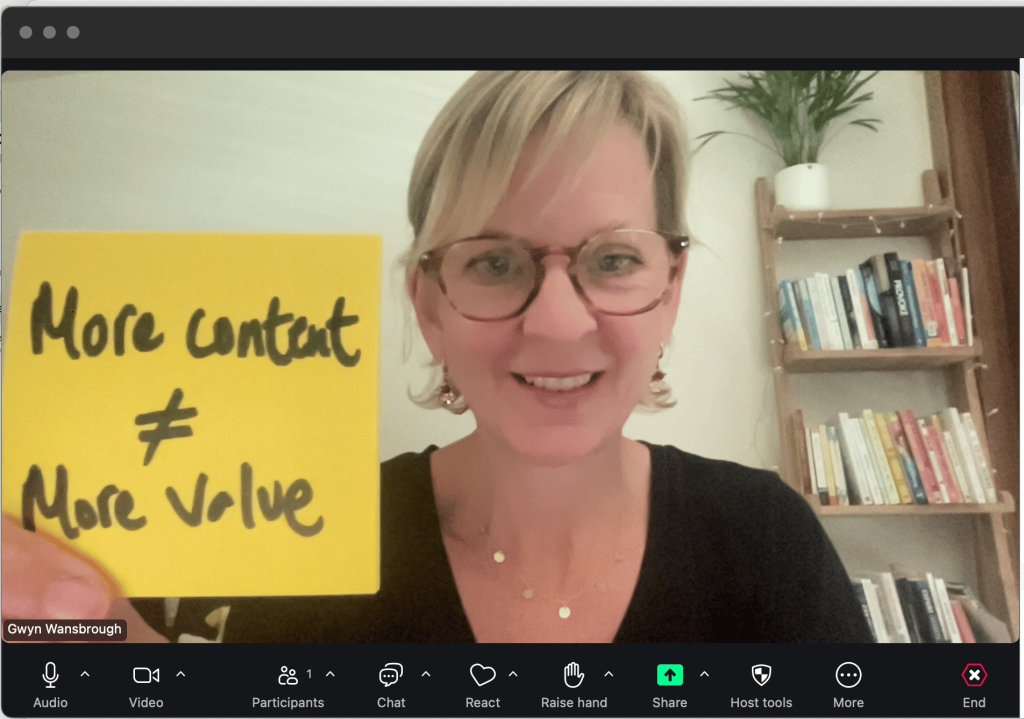
Why they work:
- They’re novel—your brain perks up when it sees something different.
- They feel more human and personal.
- They keep me concise and focused (no rambling slide text!)
Wes Kao put it best in the State-Change Method:
“Humans are alert to change.”
Slides are predictable. Your handwritten note popping into frame? That’s a pattern interrupt.
But Gwyn, what if I have to use slides?
Totally fine. Just use them sparingly:
- One idea per slide.
- Use images, big fonts, and minimal text.
- Build in pauses to come off screen and reconnect face-to-face.
Want to give it a go? Try this in your next session:
✔ Prep 3 chat prompts ahead of time. Keep them handy to paste in.
✔ Write out one key concept by hand—sticky note, index card, whatever works.
✔ Try running part of your session without sharing your screen.
🪄You might be surprised how much more present and engaged your group feels when the screen stays simple—and the focus stays on them.
Over to you 👉
Do you use alternatives to slides in your sessions? I’d love to hear!
Hit reply and tell me what’s working for you.
This Week’s Facilitator Finds 💪
In this section, you’ll find curated events, resources, tips, and tools that I’ve found super valuable — and I think you will too!
1/ ⚒️ A Smarter “Where are You Joining From”. StreamAlive founder Lux Narayan shared a fun twist on the classic opening prompt. Instead of just showing locations on a map, this version pulls in local time, weather, images—and a quirky fact about each place. See it in action on his post.
2/ 💡How to Leverage Your Signature Framework. My brilliant friend and collaborator Charlotte Crowther helps course creators (yours truly included!) turn their methods into clear, memorable frameworks. If you’ve got a system—or want to shape one—I highly recommend that you check out her work.
3/ 📆 Six Workshops for Online Event Geeks. Facilitainer Said Saddouk just dropped his June lineup of live workshops. Learn the best digital tools out there for facilitators and trainers, including StreamAlive, Butter Scenes, Luma, StreamDeck, and Miro in a fun and practical way.
💌 Thanks for reading The Quest
I always love hearing your feedback and suggestions. Just hit reply to share your thoughts and ideas.
If you were forwarded this email, you can subscribe to The Quest 👉here.
If you enjoy The Quest, I’d appreciate it if you shared it with anyone you think might like it.
Creatively yours,

Whenever you are ready there are 2 more ways I can help you:
👉Custom coaching & team training. Book a free 15-minute zero-commitment call with me to see how I can support you and your team.
👉 Live Session Design Video Course. Live Session Magic gives you a proven system for designing consistently high-quality online sessions. Join the interest list here and be the first to get access.
👉5-week Live Online Course. The Breakthrough Facilitation course gives you tools, personalized feedback, and a proven framework for designing and leading high-engagement live sessions. Join the interest list and be the first to get the next cohort dates and discounts.
