

Most people are using AI to create content faster.
But what if we used it to create better learning experiences instead? 👀
That’s the question at the heart of our April AI Mini-Quest—where we’re exploring how facilitators, trainers, and course creators can use AI to actually increase impact (not just speed things up).
This week, I sat down with my go-to for all things AI: Alexandre Eisenchteter.
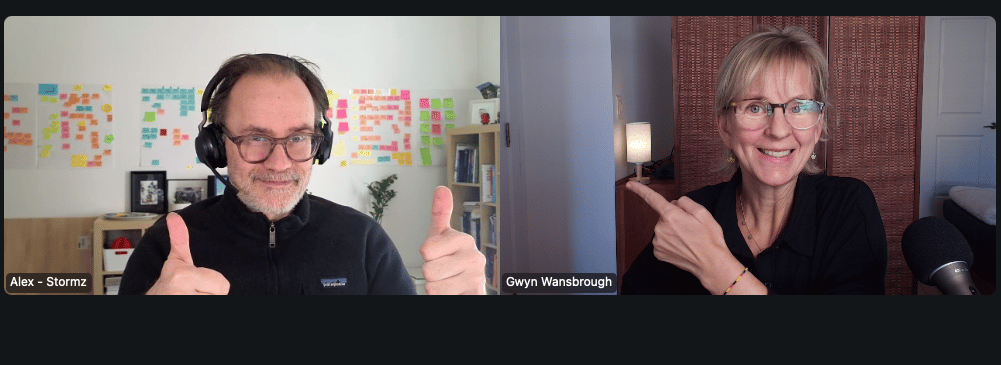
If you don’t know Alex yet—he’s a seasoned facilitator who’s been tinkering with AI since 2015 (way before it was a thing:). He’s also the creator of Stormz, an AI-powered SaaS tool designed for collaborative ideation.
Alex knows how to make AI feel practical. No fluff. Just “here’s how to actually use this.”
We talked about:
🤖 Smarter ways to use AI in your sessions (and what’s just hype)
🧠 How to turn AI into a tool to spark more ideas—not just faster answers
⚡ His workflow from ideation to delivery using AI
Here’s a recap of my 7 key takeaways from our conversation 👇
(And If you want to hear it straight from Alex, you can watch the full replay here.)
1️⃣ Pick and AI Assistant (and stick with the one that works)
This could be ChatGPT, Claude, or Gemini. Then use the AI features in facilitation tools (like StreamAlive, Zoom, Stormz, SessionLab, Menti, Miro etc…)
Alex’s advice: Don’t get stuck in ‘which tool is best’ mode. Just pick one and learn it well
2️⃣ Use AI to streamline your thinking
Instead of asking AI to design your whole session…
Try this:
✔ Voice-note your ideas → drop them into AI
✔ Use AI to structure your messy thinking
✔ Refine one section at a time
Alex also uses AI to:
- Capture client scoping calls
- Organize notes
- Iterate on session blocks
You stay in control. AI helps you think faster.
Alex’s advice: Even if AI does a decent job of generating a session plan – it’s not your plan or ideas. And that shows up in your session.
3️⃣ Train AI on your material
Ask AI to design your session from scratch and you will get session slop. Why? Because it mimics the “average workshop” session tips on the internet.
Instead, you can upload your own session outlines to ChatGPT projects (and turn memory on).
Now AI works from your ideas, your style, your experience (not the internet’s:)
4️⃣ Test your session before you run it
Use AI to pressure-test your design.
For example, you could ask AI to give you 5 expectations that the participants might have as a way of anticipating how you might have to adapt the training.
Alex’s advice: “This is an example of where AI can help you go faster so you can quickly grasp what your participants want to be able to adapt in real time.”
5️⃣ During delivery: don’t let AI do the thinking
This is where it gets interesting – and where there really is a “smart” way to use AI.
Your group generates ideas… Don’t us AI to cluster or interpret them. Let participants do that work. That way they can make meaning and own the outcome. This is how you can use AI to springboard into more ideas. Use it as a creative boost—not the final answer.
Alex’s advice: “You have to aquire intuition for when to use AI and when not to. Ideation is an example of where you don’t want to use AI to go faster.”
6️⃣ Use AI for real-time synthesis
Imagine you’ve got 50 people in your Zoom room. You ask them for their expectations from the session. You get 50 responses. It’s impossible to read all of them.
This is where you can use AI to synthesize the chat, bringing out big themes, commonialities, and outliers.
Alex’s advice: “If you want to use AI live, prepare your prompts in advance. And always tell participants when content is AI-generated (and that it might be wrong).”
7️⃣ Remember Alex’s “Sandwich Principle”
Start with your ideas → use AI to support → then refine and make it yours.
👉 Human idea → AI support → Human refinement
🤔So… is AI making live session leaders obsolete?
I ended the conversation asking him that question.
His answer: No.
AI can take you further.
But only if you understand the basic principles of how to use it (and how not to).
AI doesn’t know (yet) how to facilitate collective intelligence, or how we learn from each other. And that’s where live session leaders shine.💫
Here’s how to connect with Alex:
👉Follow Alex on LinkedIn here.
👉Learn more and join the Stormz v3 waitlist here.
👉 Check out Alex’s I 🩷Cards custom deck generator here.
Over to you 🎤
👉 What’s one way you could use AI in a “smarter” way in your online sessions? Hit reply and let me know (I read all replies).
💌 Thanks for reading The Quest
I always love hearing your feedback and suggestions. Just hit reply to share your thoughts and ideas.
If you were forwarded this email, you can subscribe to The Quest 👉here.
If you enjoy The Quest, I’d appreciate it if you shared it with anyone you think might like it.
Creatively yours,

Whenever you are ready there are 2 more ways I can help you:
👉Custom coaching & team training. Book a free 15-minute zero-commitment call with me to see how I can support you and your team.
👉 Live Session Design Video Course. Live Session Magic gives you a proven system for designing consistently high-quality online sessions. Join the interest list here and be the first to get access.
👉5-week Live Online Course. The Breakthrough Facilitation course gives you tools, personalized feedback, and a proven framework for designing and leading high-engagement live sessions. Join the interest list and be the first to get the next cohort dates and discounts.
